

If you are looking for instructions on how to sign up for Tapbit, you should first check the restrictions on use in South Korea. The Financial Services Commission included Tapbit on the list of targets in its access-blocking notice published on October 15, 2026. Bithumb also added Tapbit to the list of platforms subject to deposit and withdrawal restrictions as of August 31, 2026. If you have assets in an existing account, check your account status, identity verification, withdrawal conditions, and whether the receiving exchange supports deposits before making new deposits or trades.
Checked on: October 28, 2026. This article is based on the Financial Services Commission’s official notice and the official documents below. It does not test whether login or withdrawals work for individual accounts, and the ability to access the site is separate from eligibility to use the service.
This article contains an affiliate link to Tapbit. Coinpop may receive a commission if use of the link meets the affiliate terms. The affiliate relationship does not guarantee that the service is available in South Korea or that a discount will apply.

1. Restrictions on Using Tapbit in South Korea: What to Check Before Signing Up
The Financial Services Commission’s October 15, 2026 notice includes Tapbit among the targets of access blocking in South Korea. Read this notice separately from the exchange’s promotional claims about overseas registration or licensing. A claim that it is registered overseas does not, on its own, mean that it is permitted to register or provide services in South Korea.
Accordingly, rather than encouraging new sign-ups or deposits by South Korean users, this article first outlines the checks needed to review existing accounts and handle assets appropriately. Entering false location or residency information or using another route to bypass restrictions does not resolve eligibility issues.
| Situation | What to Check First | Next Step |
|---|---|---|
| Considering a new account | Domestic access restrictions and eligibility based on actual place of residence | Do not proceed with registration or deposits unless the restrictions have been resolved. |
| There is a balance in an existing account | Account restrictions, KYC, withdrawable balance, and network status | Check the account-specific procedure through official support channels. |
| Planning to withdraw to a domestic exchange | The receiving exchange’s supported providers, coin, network, and account-holder requirements | Do not transfer until you have confirmed support. |
| Access or verification is blocked | Official notices and account recovery or customer support procedures | Do not provide account information in response to withdrawal offers from search ads or messaging apps. |
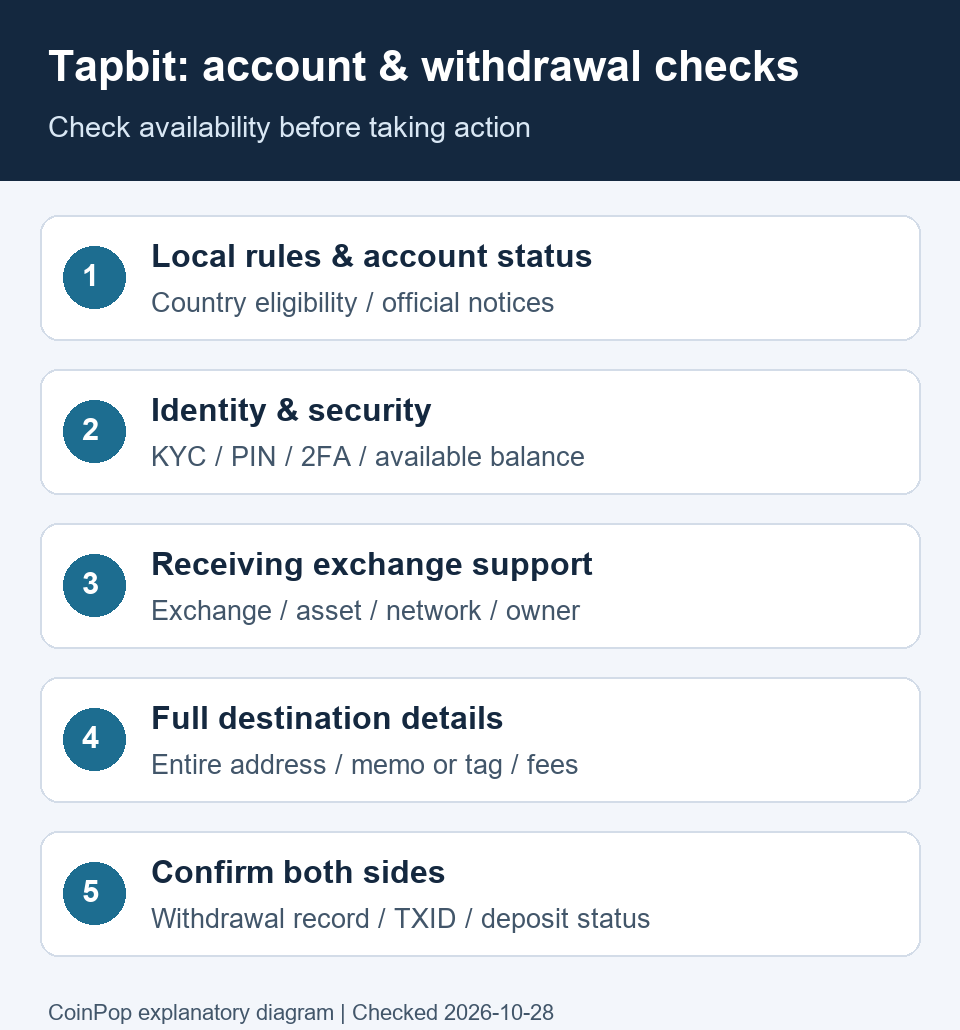
2. Existing Accounts: Check Your Balance, KYC, and Security in Order
- Account status and notices: Check the notices on the official website or app for account restrictions or requests for additional verification. Determine current availability based on your account-specific screen and the response from official support.
- Distinguish balance types: On the asset screen, distinguish your total balance from the amount available for withdrawal. Check whether any funds are tied up in open orders, positions, or subscribed products, and read the conditions and potential gains or losses involved in handling the assets.
- Identity verification status: Under ID Verification in your account settings, check whether verification is approved, pending, or requires additional information. Submit accurate information, including your legal name and actual country and place of residence.
- Security settings: Check the PIN and two-factor authentication status in the Security Center. Complete the verification required for withdrawals, and follow the instructions if a separate restriction appears after changing your authentication method.
- Keep records: Keep records of balances, withdrawals, transactions, and customer support ticket numbers. Provide identity documents only through official submission screens, and never share your password, OTP, or private keys with anyone.
The official KYC guide describes the process of submitting your country, name, date of birth, identity document information, an image of your identity document, a selfie, and other materials. Check your current account screen for the documents actually required and the status of your application. KYC approval alone does not remove regional restrictions or make withdrawal limits unlimited. Also review the official security settings guide and the eligibility and identity verification requirements in the terms of use.
3. Tapbit Withdrawals and Deposits to Domestic Exchanges: Check Both Sides’ Requirements
Withdrawing from Tapbit to an External Address
- Check with the recipient first: On the receiving exchange’s deposit screen, check whether it can accept transfers from Tapbit and whether it supports the asset and network. The fact that a deposit address is displayed does not mean transfers from every exchange or through every route are permitted.
- Open the withdrawal screen: The route in the official guide is Assets → Withdraw → On-chain. Select the asset and the same network supported by the recipient. When sending to a domestic exchange, do not confuse this with an Internal transfer between Tapbit accounts.
- Match the complete address and tag: Copy and paste the address from the recipient’s deposit screen, then verify the complete address. Do not check only a few characters at the beginning or end, or reuse a similar address from your transaction history. For assets that require a Memo or Tag, enter that value accurately as well.
- Check the amount and recipient: Check the currently displayed withdrawable amount, limits, minimum withdrawal, fee, and final amount to be received. If recipient exchange or recipient details are requested, enter accurate information and confirm that the account holder’s name matches.
- Confirm completion: After verification and submission, check the status and TXID in your withdrawal history. Blockchain confirmation and crediting by the receiving exchange are separate steps, so check the balance on the receiving side as well.
The withdrawal route and PIN/2FA requirements were checked against the Tapbit official withdrawal guide (2026-10-28). The actual screen and whether a withdrawal can be processed may vary depending on network maintenance, account review, and regional conditions. This article does not guarantee successful withdrawals or processing times.
When Receiving to Upbit or Bithumb: Check Deposit and Withdrawal Restrictions First
Bithumb’s notice on deposit and withdrawal restrictions for unregistered providers says that it added Tapbit to the list of restricted platforms as of August 31, 2026, and that deposits and withdrawals involving the listed exchanges are restricted regardless of amount (checked on 2026-10-28). Do not rely on earlier statements that integration was planned or completed, or interpret this as merely an unconfirmed support status; first recognize that Tapbit is a restricted platform. If you already have a deposit on hold or a return issue, check Bithumb’s official customer support instructions and Tapbit’s records together.
In Upbit’s list of overseas operators that support Travel Rule integration, account holder verification integration, and have passed risk assessment—available for deposits and withdrawals (list date: 2026-10-16; checked: 2026-10-28)—we could not find Tapbit. Do not assume it is an exchange that generally accepts deposits from Korea and send funds there; check the receiving exchange’s latest guidance to confirm whether it can process the transfer.
Upbit provides guidance on Travel Rule, account-holder verification, and proof-of-origin procedures for deposits and withdrawals equivalent to KRW 1 million or more. It also states that repeated deposits and withdrawals may be rejected as suspicious transactions even if they are below KRW 1 million. This article does not suggest that splitting amounts or routing funds through a personal wallet will resolve restrictions. Follow the proper procedures to verify your account, recipient information, and supported transfer route. Source: Upbit Travel Rule guide (checked on 2026-10-28).
If a Withdrawal Is Delayed or a Deposit Is Put on Hold
| Status Checked | Where to Check | What to Ask About |
|---|---|---|
| Withdrawal not submitted or under review | Tapbit withdrawal history and account notices | KYC, security, or regional restrictions; withdrawal limits; and network maintenance status |
| TXID available, but still processing | Withdrawal history and the relevant network explorer | Whether the transfer was actually sent and the network confirmation status |
| Deposit not reflected domestically after confirming the transfer | Receiving exchange deposit history · customer support | Supported provider · account holder verification · proof of source · tag requirements |
| Unsupported · return information | Return procedures at the receiving exchange | Check return eligibility, requirements, and address; Tapbit's receiving requirements |
When submitting an inquiry, organize the asset, network, amount, time, TXID, and error message. Do not post account-identifying information or authentication details on public forums. A return cannot be assumed to be automatic or immediate; check the guidance from both customer support teams.
4. Tapbit Fees: Distinguishing Base Rates, Discounts, and Withdrawal Costs
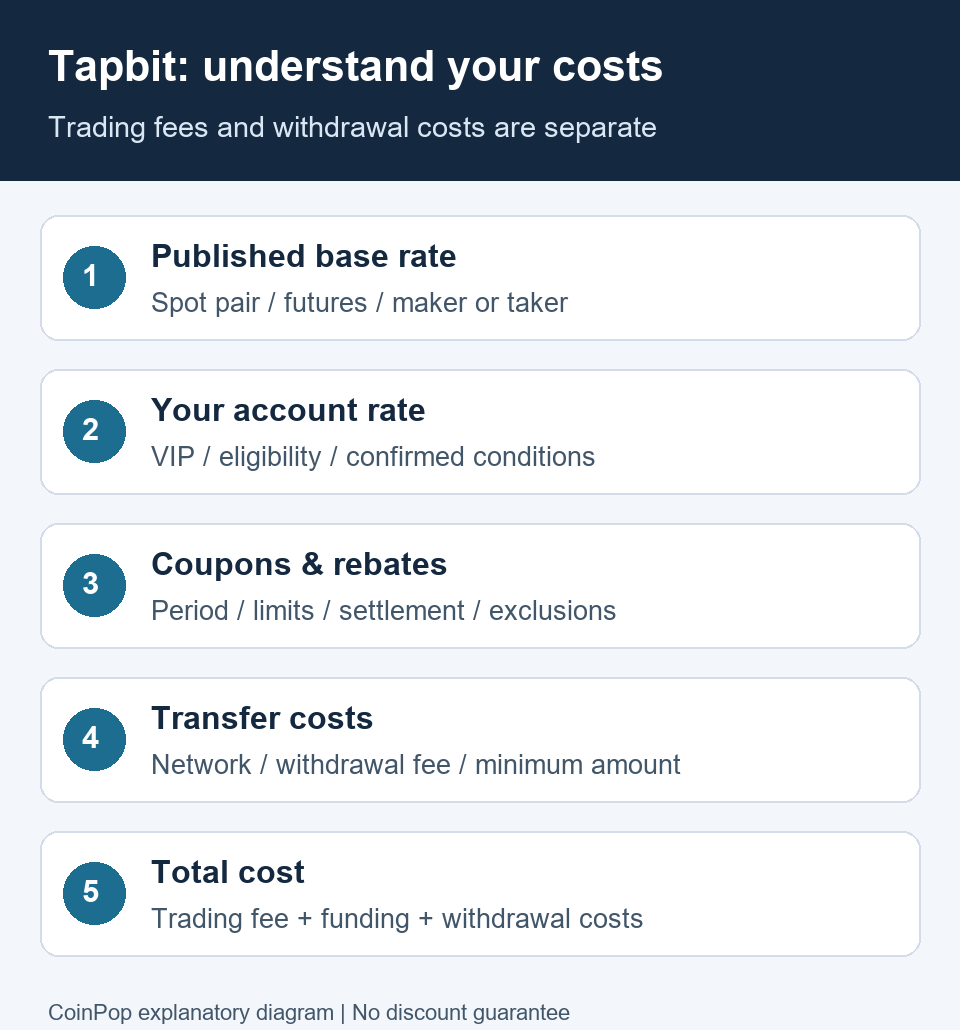
The following are the base trading fees published in Tapbit official Fees (Spot & Derivatives). The document was updated on 2025-12-29 and checked on 2026-10-28. Check the current screen again before placing an order for account-specific VIP, promotional, or trading-pair terms.
| Category | Maker | Taker |
|---|---|---|
| Spot BTC/USDT | 0% | 0% |
| Spot ETH/USDT | 0% | 0% |
| Other spot trading pairs | 0.1% | 0.1% |
| Derivatives | 0.02% | 0.06% |
A maker order adds liquidity to the order book, while a taker order immediately matches with existing liquidity. Trading fee = actual executed amount × applicable rate. For example, if a derivatives trade is executed for 1,000 USDT and the base taker rate of 0.06% applies, the one-way trading fee is 0.6 USDT. Entering and exiting with the same amount gives a simple total of 1.2 USDT. This example does not include funding fees, slippage, or withdrawal costs.
The previous article's claims of “60% for life” and “61% automatic discount” gave different figures, and we could not verify the current terms of application, so we removed the guarantee language. The existence of a previous Tapbit affiliate route is separate from whether a discount or cashback applies to an actual account. Check the official screen for the discount rate, eligible trading pairs, settlement method, duration and limits, and exclusions. Do not treat coupons, trial funds, or trading bonuses as equivalent to cash-withdrawable balances.


5. Tapbit Security and Reserves: Scope of Available Verification Materials
Account security settings, the exchange's reserve disclosures, and eligibility for domestic use are separate items to verify. Security features or a history of overseas registration do not justify claims such as “completely safe,” “guaranteed incident-free,” or “legally available for use domestically.”
Tapbit's Contract Insurance Fund information (updated 2025-06-06, checked 2026-10-28) describes the company's compensation commitments concerning platform disruptions and abnormal price movements. It should not be interpreted as bank deposit insurance or automatic compensation for all hacking incidents or trading losses. Check the applicable official terms for actual coverage, review, and compensation.

When reviewing reserve materials, distinguish the date of the data, disclosed addresses, assets covered, scope of liabilities included, and the verifier. The past screen above alone cannot verify all current assets and liabilities or current withdrawal availability. The exchange's own descriptions should also be read separately from external verification materials.
6. Tapbit Service Screens: Past Examples for Understanding Features
The following are service screens retained from the previous article. This is not an indication that the service is currently available to users in Korea. The prices, returns, indicators, and product counts shown on screen were displayed at the time the images were captured; do not use them as current values for signup or trading decisions.


7. Frequently Asked Questions About Tapbit
Can I follow the Tapbit signup instructions as written in Korea?
First, check domestic restrictions on use. In its notice dated October 15, 2026, the Financial Services Commission included Tapbit among the targets of access blocking. Creating an account or successfully accessing the site does not confirm eligibility to use the service domestically.
Are withdrawal limits unlimited once I complete KYC?
No. KYC, regional eligibility, security verification, and the available withdrawal balance and limits are separate matters. Make your assessment based on the withdrawal screen for your current account and any additional verification requests.
Can I withdraw directly from Tapbit to Upbit or Bithumb?
Do not send funds assuming this is a generally supported route. We could not find Tapbit on Upbit's publicly listed VASP list as of October 16, 2026. Since August 31, 2026, Bithumb has included Tapbit among the entities subject to deposit and withdrawal restrictions, and states that the restriction applies regardless of amount. Check pending deposits or returns with the receiving exchange's official customer support and keep records from both sides.
Can I avoid Travel Rule restrictions by splitting transfers into amounts under KRW 1 million?
We cannot recommend doing that. Upbit states that repeated deposits and withdrawals may be rejected as suspicious even if each is under KRW 1 million. Follow a valid supported route and the account holder and recipient verification procedures.
Does using a Tapbit affiliate link automatically apply a 61% lifetime discount?
We could not verify the current rate or the terms for automatic lifetime application. We have corrected the previous inconsistent claims of 60% and 61%. The existence of an affiliate link is separate from whether a discount or cashback applies to an actual account; check the current official terms.
What should I do if the withdrawal is marked complete but the funds have not arrived at a domestic exchange?
Check the TXID and network confirmation status, then review the receiving exchange's deposit history for account holder verification, proof of source, tag, and supported-provider requirements. For a pending deposit or return, contact the receiving exchange's customer support first and keep Tapbit's withdrawal records as well.
8. Official Sources and Correction Log
- Financial Services Commission: Domestic Access Blocking of Websites of Illegal Virtual Asset Service Providers — Published 2026-10-15; Tapbit appears in the image of the targets.
- Tapbit: Terms of Use — Updated 2026-01-20. Regional eligibility, identity verification, and account restriction terms.
- Tapbit: KYC Verification / Account Security Settings / Withdrawal Guide — Must be checked separately against the actual account screen.
- Tapbit: Fees (Spot & Derivatives) — Updated 2025-12-29. Base trading rates.
- Tapbit: Contract Insurance Fund — Updated 2025-06-06. The scope of compensation as described by the company.
- Upbit: Travel Rule Guide / Supported VASP List — List dated 2026-10-16. Requirements vary by case, including account holder and deposit source verification.
Correction dated 2026-10-28: Updated to reflect domestic access restrictions and Bithumb's Tapbit deposit and withdrawal restrictions dated 2026-08-31. Removed unsupported definitive claims that Bithumb integration was planned or completed, growth and ranking figures, unlimited withdrawals, guaranteed lifetime discounts, and recommendations to split transfers. Expanded the steps for checking existing accounts, withdrawals, and the receiving exchange, as well as the fee calculation example and FAQ. This review is based on publicly available documents; no actual account or deposit/withdrawal tests were performed.
For comparison criteria for other exchanges, see the Exchange Comparison Guide, but check regional eligibility and deposit and withdrawal support before trading volume or rankings.
Official site: Tapbit · Information on the previous affiliate route: Check Tapbit Affiliate Link · Affiliate terms inquiries: support@coinpopbit.com. Contact the exchange's official customer support regarding account recovery and withdrawal reviews.
Reference link for users who need to check the previous affiliate address: Previous Tapbit Affiliate Address. This link does not encourage new domestic signups or deposits, nor does it guarantee current benefits. Crypto assets and derivatives involve risk of loss.