OKX Referral Code (COINPOP): 20% Off Trading Fees
What OKX's sign-up page states for code COINPOP, base vs. 20%-off rates, how to apply and check it · checked 2026-11-12
What OKX's sign-up page shows
Captured 2026-11-12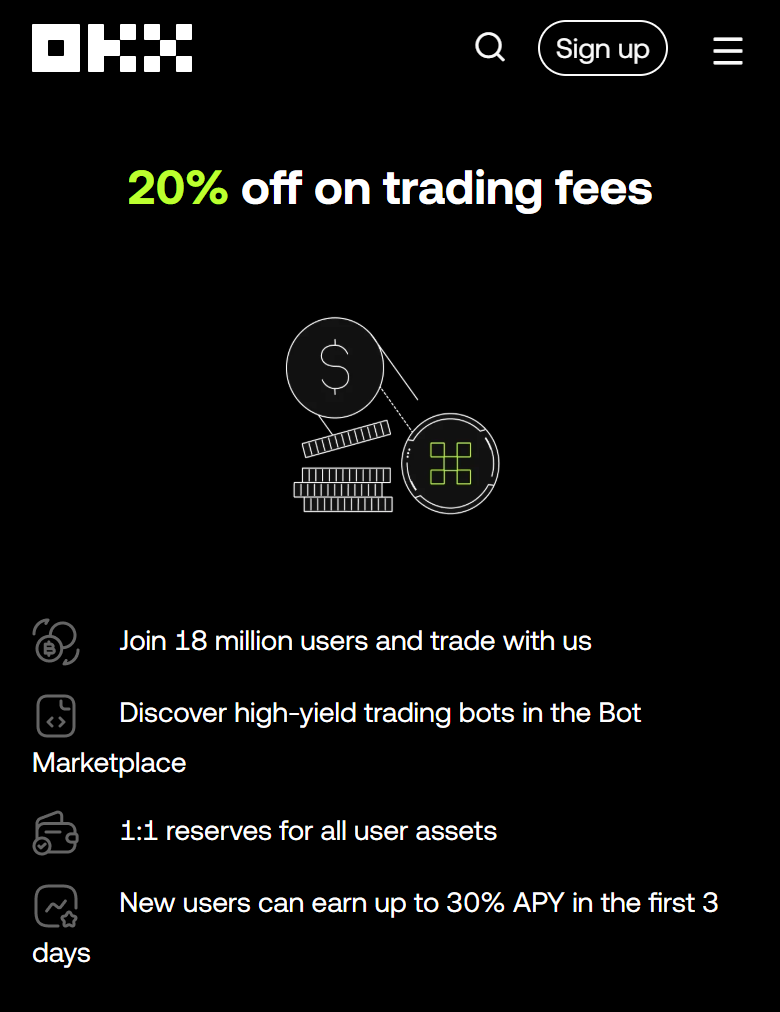
- Headline offer: "20% off on trading fees". This is the only fee claim on the page.
- Not stated on the page: how long the discount lasts, which products it covers, any minimum volume, or which regions are eligible.
- Also advertised by OKX: "New users can earn up to 30% APY in the first 3 days." Its conditions are not stated, so we do not evaluate it here.
- Our rule: we repeat only what OKX shows. No lifetime discount and no cash payback is claimed anywhere on this page.
OKX Official Fees: Base vs. 20% Off
Base compared: 2026-11-11| Market (Regular user) | Base Maker / Taker | With 20% off (calculated) | Official Fees |
|---|---|---|---|
| Futures | 0.0200% / 0.0500% | 0.0160% / 0.0400% (-20%) | Fee Schedule ↗ |
| Spot | 0.0800% / 0.1000% | 0.0640% / 0.0800% (-20%) | Fee Schedule ↗ |
How to Sign Up With the Code
- Open the CoinPopBit link above, or go to OKX's registration page directly.
- Select your country or region when OKX asks. Available products and offers depend on it.
- On the sign-up form, expand Referral code (optional) and enter COINPOP if it is not already filled in. Do this before you finish creating the account.
- Complete OKX's verification steps for your region.
When Should You Enter the OKX Referral Code?
Source: OKX help center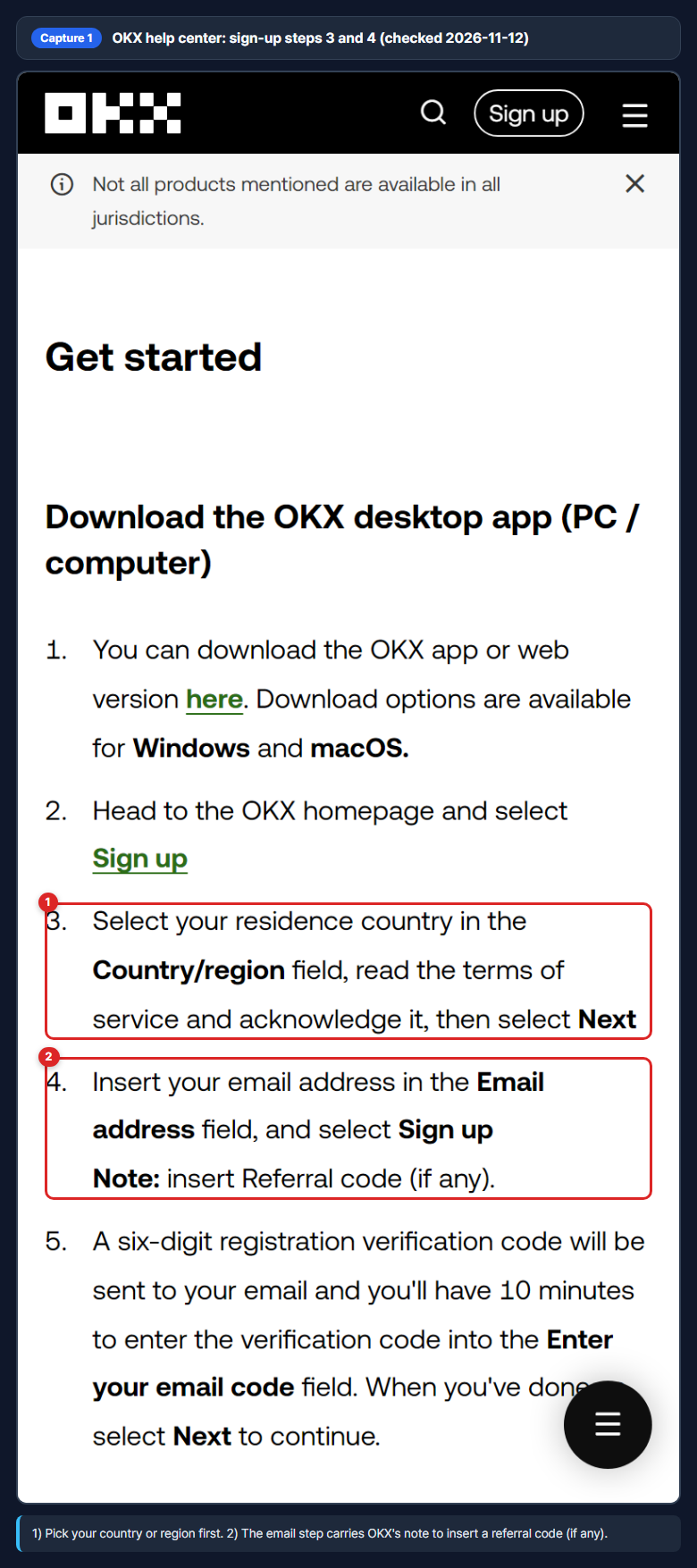
Enter it while you create the account, on the sign-up form. OKX's registration guide puts the referral code note at the email step, right after you choose your country or region. In OKX's Referral Program FAQ the field is labelled Referral code (optional); if you do not see it, OKX says to register through a referral link instead.
The timing is strict. OKX states that the code must be applied before sign-up is completed and can't be added afterwards, and that once registration is complete the referral relationship usually can't be added or changed. So the order is: country, then email with the code, then verification.
Why Isn't the Code Filled In or Not Working?
Source: OKX Referral Program FAQ- Not filled in after opening the link: OKX says to open the referral link again, or type the code into the sign-up form yourself.
- Causes OKX lists: downloading the app separately and registering there, another channel (such as an ad) being credited first, and private-browsing or cache problems.
- If the code was not applied: OKX says no referral relationship is created when the code is not applied successfully or the account does not meet the new-account requirements.
- Do not fix it by re-registering: OKX advises against deleting your account or opening another one to change the code, and says that re-registering does not restore the original referral relationship.
Does the Code Work in Your Country?
Source: OKX help centerOKX says offers and reward amounts can differ by country or region, which is why its sign-up flow asks for your country first. Two OKX statements are worth knowing before you rely on any fee offer:
- United States: OKX notes that certain cryptocurrencies, services and products are not available to users located in the United States.
- EEA: OKX's EEA Affiliate FAQ (updated Oct 22, 2026) says that whether an invite code includes a fee reduction, and at what rate, is set by each channel and depends on your country of residence. It lists the Netherlands and Malta as spot-only and Spain as not offering it.
We cannot tell from OKX's pages how those EEA statements apply to the COINPOP code in a given country. Rely on the offer OKX shows on your own sign-up screen, and treat the 20% line on this page as what OKX displayed on the date we checked.
Check the Discount Is Applied
Already Have an OKX Account?
What Happens After Sign-Up: Identity Verification
Source: OKX help center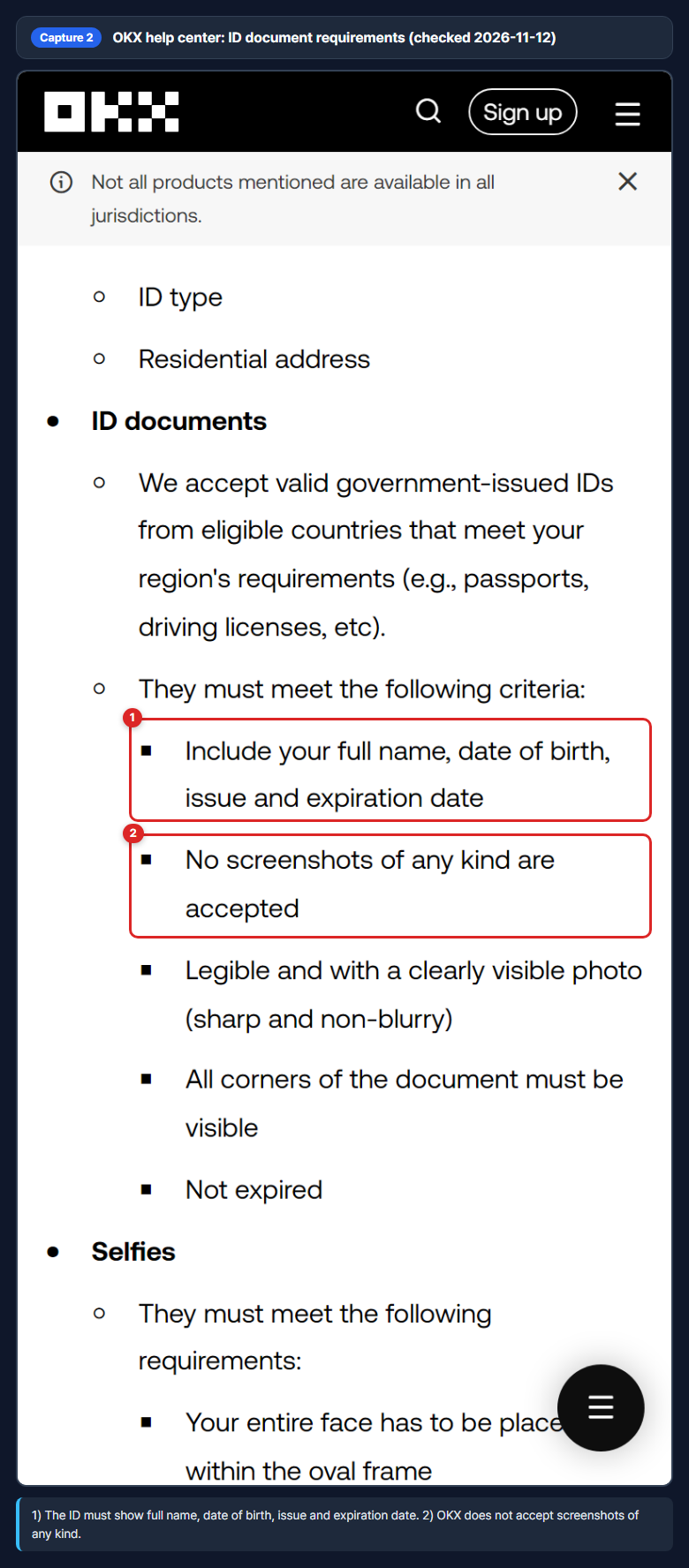
OKX's guide says you start verifying right after the password step, and that trading, deposits and withdrawals open once verification is complete. On the web it starts under your profile icon > Verification > Individual account; in the app it is under Menu > Account settings > Profile > Identity verification.
You are asked for basic details (country of residence, nationality, name, date of birth, ID number and type, address), a government-issued ID and a selfie. Proof of address is requested where applicable and must be issued within the last 3 months (6 months for EEA users).
OKX says applications are reviewed within 24 hours. Its help page lists the document and selfie requirements but does not describe what happens after a rejection, so check your OKX notifications or contact OKX support if verification fails. See OKX's verification guide (updated Aug 25, 2026).
How Does OKX Set Your Fee Tier?
Source: OKX fee schedule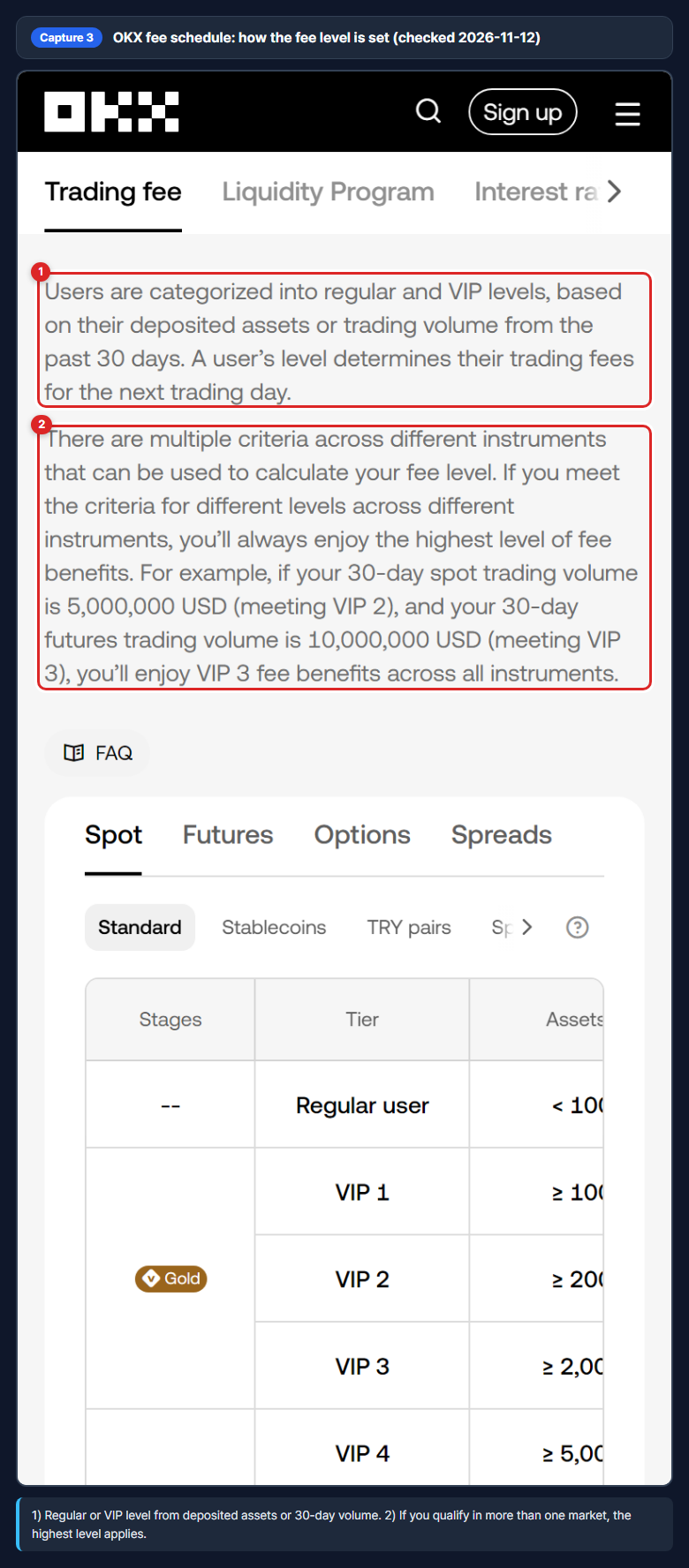
OKX sorts users into a Regular level and VIP levels. According to its fee schedule, the level depends on your deposited assets or your trading volume over the past 30 days, and the level you reach sets your fees for the next trading day.
If you meet the criteria for different levels in different markets, OKX applies the highest one across all instruments. Its own example: 5,000,000 USD of 30-day spot volume meets VIP 2, 10,000,000 USD of 30-day futures volume meets VIP 3, so VIP 3 fees apply everywhere.
| OKX level | Futures Maker / Taker | Spot Maker / Taker | Asset threshold |
|---|---|---|---|
| Regular user | 0.0200% / 0.0500% | 0.0800% / 0.1000% | < 100,000 USD |
| VIP 1 | 0.0160% / 0.0450% | 0.0675% / 0.0800% | ≥ 100,000 USD |
| VIP 2 | 0.0150% / 0.0360% | 0.0600% / 0.0700% | ≥ 200,000 USD |
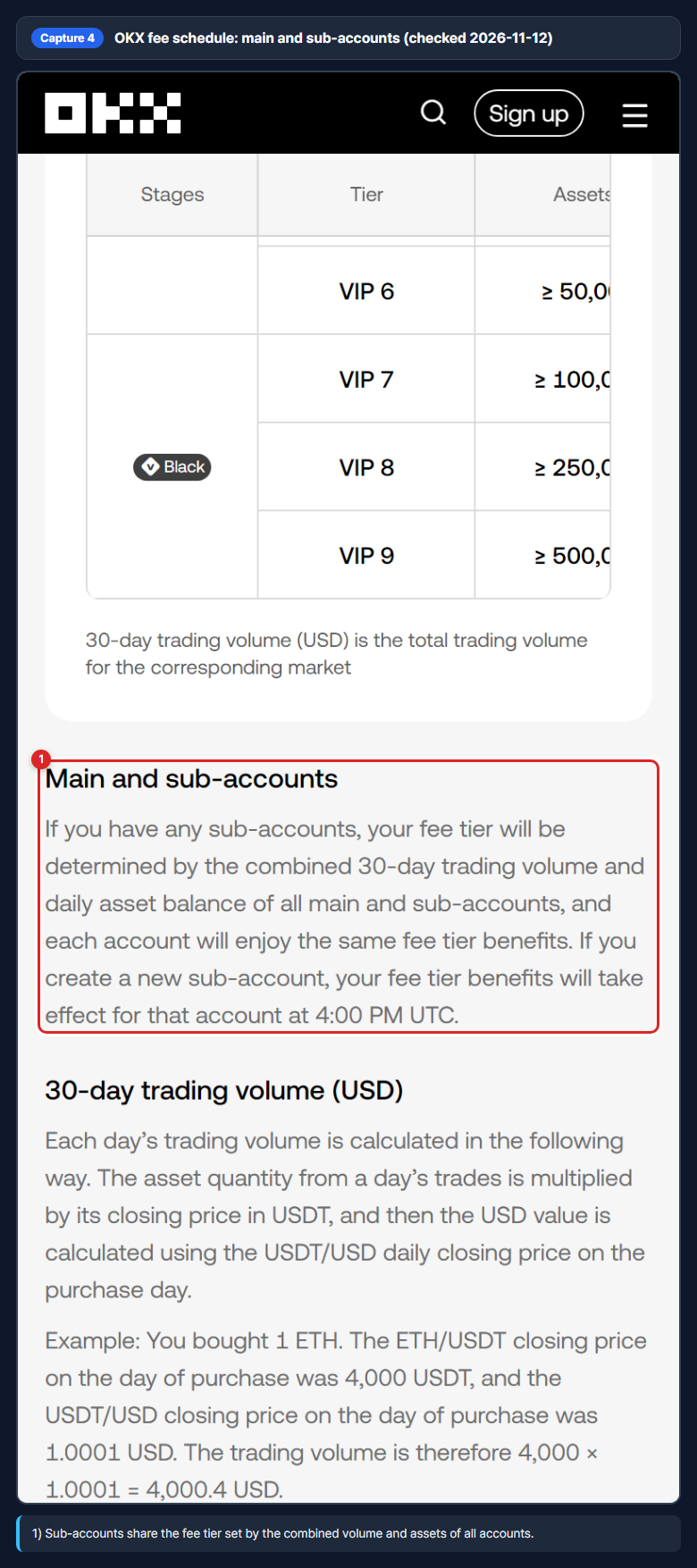
Sub-accounts do not get a separate tier. OKX says the tier is set by the combined 30-day trading volume and daily asset balance of the main account and all sub-accounts, and every account gets the same tier benefits. For a newly created sub-account, the tier benefits take effect at 4:00 PM UTC.
FAQ
What is the OKX referral code for CoinPopBit?
What discount does the COINPOP code give?
Does the 20% apply to spot and futures?
Can I add the referral code after my OKX account already exists?
When should I enter the OKX referral code?
Why isn't the COINPOP code filled in automatically?
Does the COINPOP code work in the US, the EEA or my country?
How long does OKX identity verification take?
Can I use the code in the OKX mobile app?
How does CoinPopBit earn from this page?
Sources and Disclosure
Sources: OKX COINPOP sign-up page (offer text, 2026-11-12), OKX fee schedule (base rates), and the OKX help-center pages linked above. This page uses CoinPopBit's OKX partner link, so CoinPopBit may earn a commission at no extra cost to you; see our editorial policy.
Crypto and leveraged futures trading can lose more than any fee saving. This page is information, not financial advice. See the terms and privacy policy.