Bybit Referral Code (COINPOP): 20% Fee Discount for 90 Days
What Bybit's sign-up page shows for code COINPOP, base vs. 20%-off rates, how to apply and check it · checked 2026-11-12
What Bybit's sign-up page shows
Captured 2026-11-12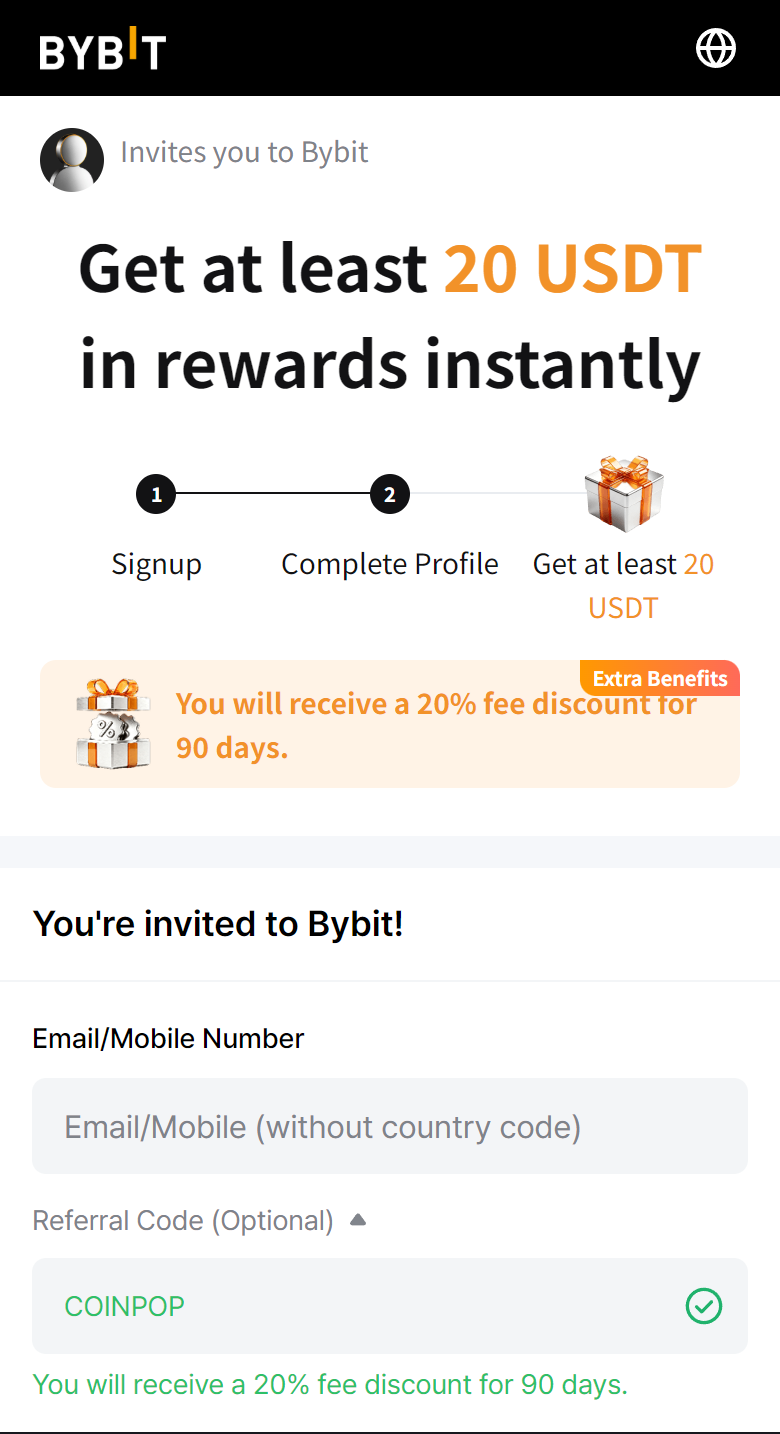
- Headline offer: "You will receive a 20% fee discount for 90 days." It is shown next to the pre-filled code COINPOP.
- Also shown: "Get at least 20 USDT in rewards instantly". Bybit does not state the conditions on this page, so we do not evaluate it.
- Not stated on the page: which products the discount covers, whether it needs a deposit or trading volume, and when the 90 days start.
- Partner link vs. code only: the 20% line appeared when we arrived through the partner link. A plain bybit.com sign-up address carrying only ?ref_code=COINPOP showed the rewards headline but not the 20% line, so use the partner link button.
- Our rule: we repeat only what Bybit shows. No lifetime discount and no cash payback is claimed anywhere on this page.
Bybit Official Fees: Base vs. 20% Off
Base compared: 2026-11-12| Market (VIP 0) | Base Maker / Taker | With 20% off (calculated) | Official Fees |
|---|---|---|---|
| Perpetual & Futures | 0.0200% / 0.0550% | 0.0160% / 0.0440% (-20%) | Fee Structure ↗ |
| Spot (crypto-crypto) | 0.1000% / 0.1000% | 0.0800% / 0.0800% (-20%) | Fee Structure ↗ |
How to Sign Up With the Partner Link
- Open the CoinPopBit partner link above. Bybit's sign-up page should show the 20% line and the code COINPOP already filled in.
- Enter your email or mobile number and finish sign-up. Check that the Referral Code (Optional) field still shows COINPOP; if it is empty, enter it before you finish.
- Complete Bybit's identity verification where your region requires it.
When Should You Enter the Bybit Referral Code?
Source: Bybit sign-up page, help center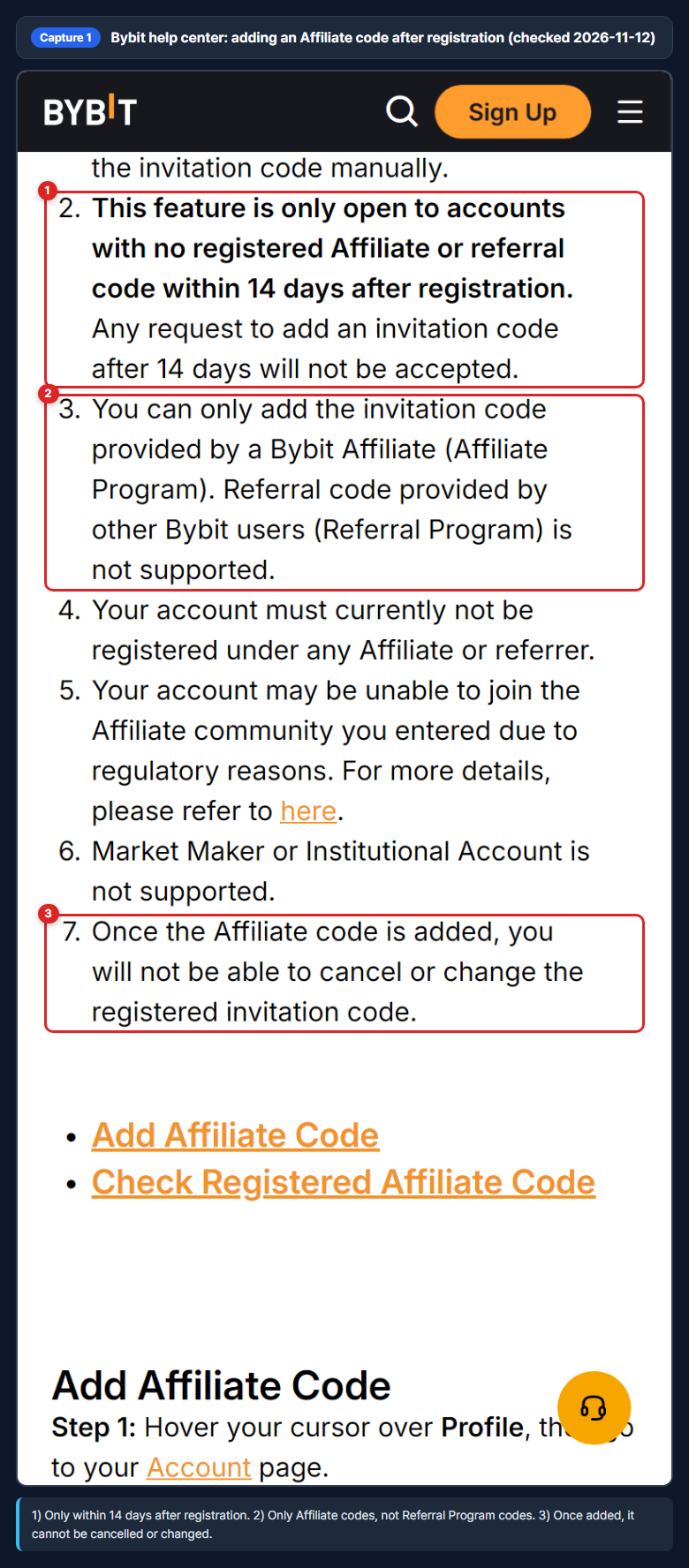
At sign-up. Reached through the CoinPopBit partner link, Bybit's sign-up page showed COINPOP already filled in the Referral Code (Optional) field together with the 20% line (checked 2026-11-12). A plain bybit.com sign-up address carrying only ?ref_code=COINPOP showed the rewards headline but not the 20% line, so start from the partner link.
After registering, the window is narrow. Bybit's help center (updated 2026-06-05) lets you add an Affiliate's invitation code manually within 14 days after registration, with limits: Main Account only, no Affiliate or referral code already on the account, codes from Bybit Affiliates only (not Referral Program codes from other users), no Market Maker or Institutional accounts, possible refusal for regulatory reasons, and no cancelling or changing once added. We have not tested adding COINPOP after registration.
Why Doesn't the Code or the 20% Line Show Up?
Source: our checks, Bybit help center- You opened a plain sign-up address: in our check of a bybit.com address carrying only ?ref_code=COINPOP, the 20% line did not appear. Use the partner link button.
- You are served by Bybit EU: on bybit.eu our test of COINPOP returned "Referral code is invalid within this link". Do not assume the offer applies there.
- You already registered: see the 14-day rules above. Bybit says that if the Join an Affiliate's Community entry under Account Info is missing, your account has not met the criteria.
- You cannot see which code is on your account: Bybit says certain Affiliate IDs may not appear on the Account Info page because of the Affiliate's privacy settings, and that this does not affect your participation in the Affiliate community.
Bybit Referral Bonus, Welcome Gifts and the Card: What Is What
Source: Bybit help center and Rewards Hub, read 2026-11-15Searches for a Bybit referral code often mix up three different things. They come from separate Bybit programs with their own rules.
- Affiliate code (what COINPOP is). Bybit Affiliates are partners such as CoinPopBit. Reached through our partner link, Bybit's sign-up page showed "You will receive a 20% fee discount for 90 days." and "Get at least 20 USDT in rewards instantly" (checked 2026-11-12).
- Referral Program code (from another user). Bybit's Referral Program FAQ (updated 2026-11-06) describes rewards for a friend who signs up with another user's referral code or link. For referees registered on or after 10 October 2026: a first trade of at least $50 within 14 days of registration gives each side 50 USDT. Reaching $500 in cumulative trading volume within 30 days after that first trade gives each 100 USDT, and reaching $10,000 gives each another 100 USDT, up to 500 USDT for the pair. The referrer can also earn up to 30% commission. Bybit says this program is for Bybit Global users and some regions get different programs (Referral Program FAQ).
- One code per account. The sign-up form has a single Referral Code field, and Bybit only lets you add a code later if the account has no Affiliate or referral code yet. You are choosing one or the other, not stacking them.
- Welcome gifts are separate from the code field. When we opened Bybit's Rewards Hub logged out on 2026-11-15, it showed "100 USDT Welcome Gifts" in three steps: a 20 USDT fee saver after identity verification, a 30 USDT position airdrop after a deposit of $10 or more, and a 50 USDT fee saver after trading $10 or more (all on derivatives). The rules say tasks are first come, first served, can differ by user and region, need Identity Verification Lv. 1, and that derivatives rewards may not be available where derivatives trading is prohibited. A fee saver or position airdrop is a trading credit, not cash you can withdraw.
- "30,000 USDT bonus" videos. We did not see a new-user offer of that size on the Rewards Hub on 2026-11-15. Large "up to" figures usually add together many separate campaigns. Go by what your own Rewards Hub and each campaign's terms show.
- Your own referral code. To invite others, Bybit's help center says to open More > Referral Program on bybit.com or go to the referral dashboard (How to Retrieve Your Referral Code).
- Bybit Card has its own referral code. The Bybit Card Referral Program (FAQ updated 2026-11-14) is separate. The referrer can earn 20 USDT and the referee 10 USDT after the referee is approved for a virtual card and spends at least 100 USDT within 30 days, and the program excludes European Economic Area customers. Its code is entered in the card application, not at account sign-up (Card Referral FAQ). COINPOP is a sign-up code, not a Bybit Card code.
Check the Discount Is Applied
Already Have a Bybit Account?
What Happens After Sign-Up: Identity Verification
Source: Bybit help center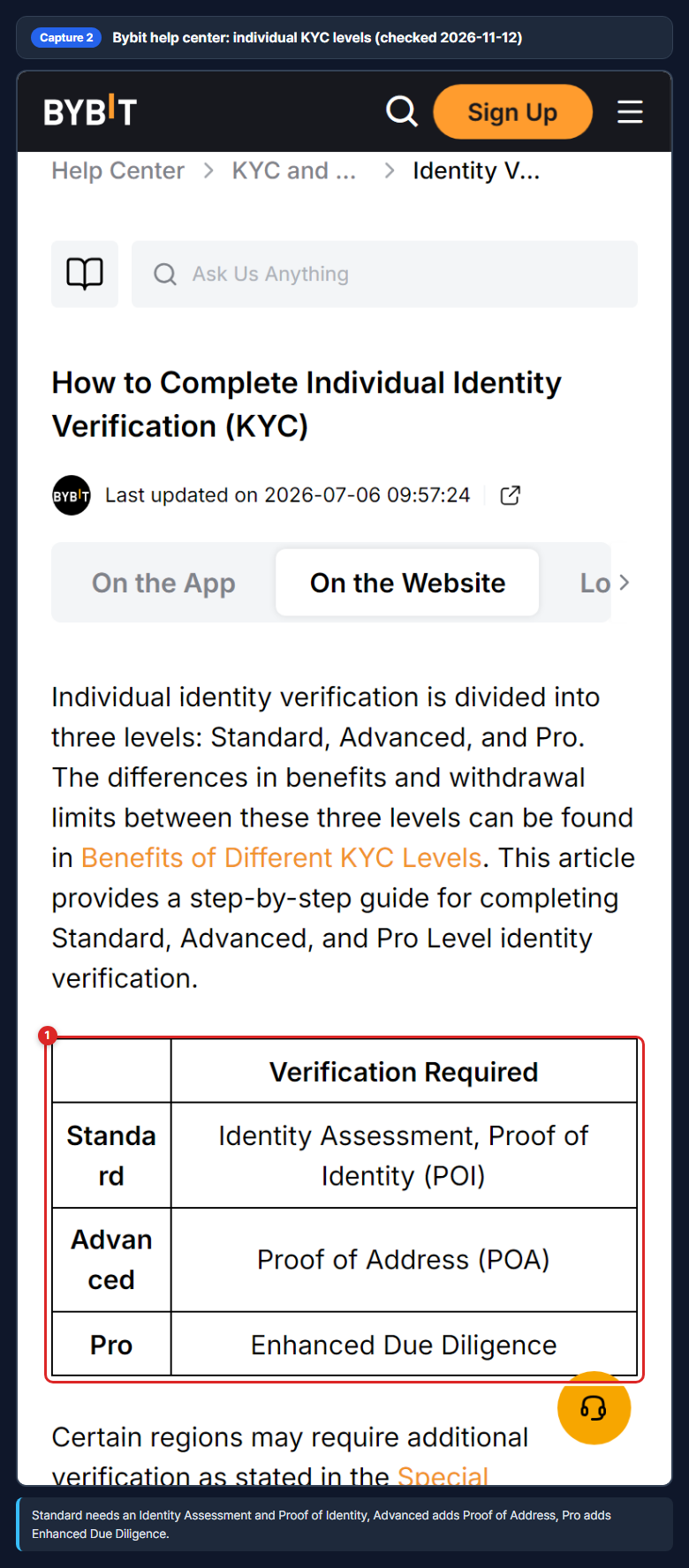
Bybit divides individual verification into three levels. Standard needs an Identity Assessment and Proof of Identity (an ID photo and a facial scan), Advanced adds Proof of Address, and Pro adds Enhanced Due Diligence. After Standard, Bybit says you can deposit and start trading.
To start, open your profile > Account and choose Verify Now under Identity Verification, then select your country of residence. Bybit asks you to choose it accurately because it influences the process, and changing it later may require additional verification.
For the ID step the photo must clearly show your full name and date of birth, and you then complete a facial recognition scan on a laptop camera or by scanning a QR code with your phone. If you cannot reach the scan after several attempts, Bybit says to try again after 30 minutes and to contact support if it persists. Proof of address, where required, must be dated within the last three months.
Bybit's page gives no review time; it says the identity assessment is normally completed automatically right after the ID step. Some regions require additional verification. See Bybit's individual KYC guide (updated 2026-07-06).
Bybit EU (EEA) and Restricted Regions
FAQ
What is the Bybit referral code for CoinPopBit?
What does the COINPOP code give?
Is the 20% discount a lifetime discount?
Does the code work on Bybit EU?
Can I add the code after I have already registered?
When should I enter the Bybit referral code?
Why doesn't the 20% line show on Bybit's sign-up page?
How do I add or check an Affiliate code after registering?
Which Bybit verification level do I need to start trading?
How long does Bybit identity verification take?
Is there a Bybit referral bonus?
What is the difference between a Bybit referral code and an affiliate code?
Where do I find my own Bybit referral code?
How does CoinPopBit earn from this page?
Sources and Disclosure
Sources: Bybit's sign-up page reached through the CoinPopBit partner link (offer text, 2026-11-12), the Bybit fee structure (base rates), Add and Check Registered Affiliate Code, Service Restricted Countries, and for the bonus section (read 2026-11-15) the Referral Program FAQ, Rewards Hub, How to Retrieve Your Referral Code and Bybit Card Referral FAQ. This page uses CoinPopBit's Bybit partner link, so CoinPopBit may earn a commission at no extra cost to you; see our editorial policy.
Crypto and leveraged futures trading can lose more than any fee saving. This page is information, not financial advice. See the terms and privacy policy.