Bitget Referral Code: What It Gives, Fees and Sign-Up Rules
What Bitget's sign-up page shows for our link, what its VIP trial pass is, Bitget's fees, whether a code can be added later, and where Bitget is not available.
On this page
What does Bitget's sign-up page show?
checked 2026-11-25Shown on Bitget's sign-up page reached through the CoinPopBit link (desktop: left panel; mobile: below the form), checked 2026-11-25: a VIP trial pass card reading "VIP1" and "Trial pass", then these lines:
- "Claim trial pass"
- "Claim the VIP trial pack via KOL's referral link."
- "Activate trial pass"
- "Activate your VIP trial pass on the VIP page or Coupons Center to start enjoying VIP perks."
- "Unlock VIP trial pack"
- "Subscribe to exclusive high-yield Earn products or start trading with vouchers."
- "After you register, it takes about 5 minutes to sync and bind your account. Once it's done, you can claim the VIP pack. If the claim fails, try again later."
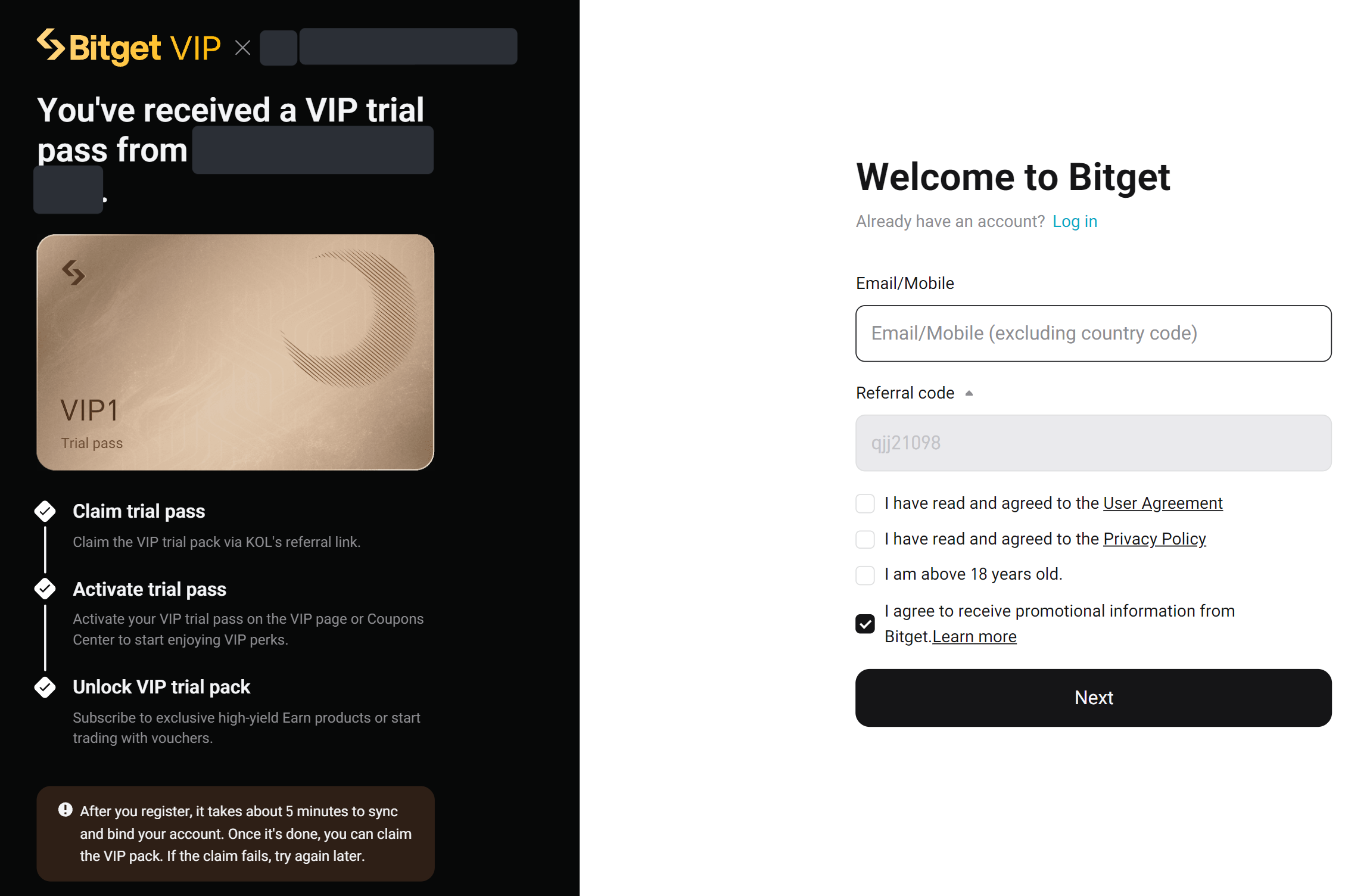
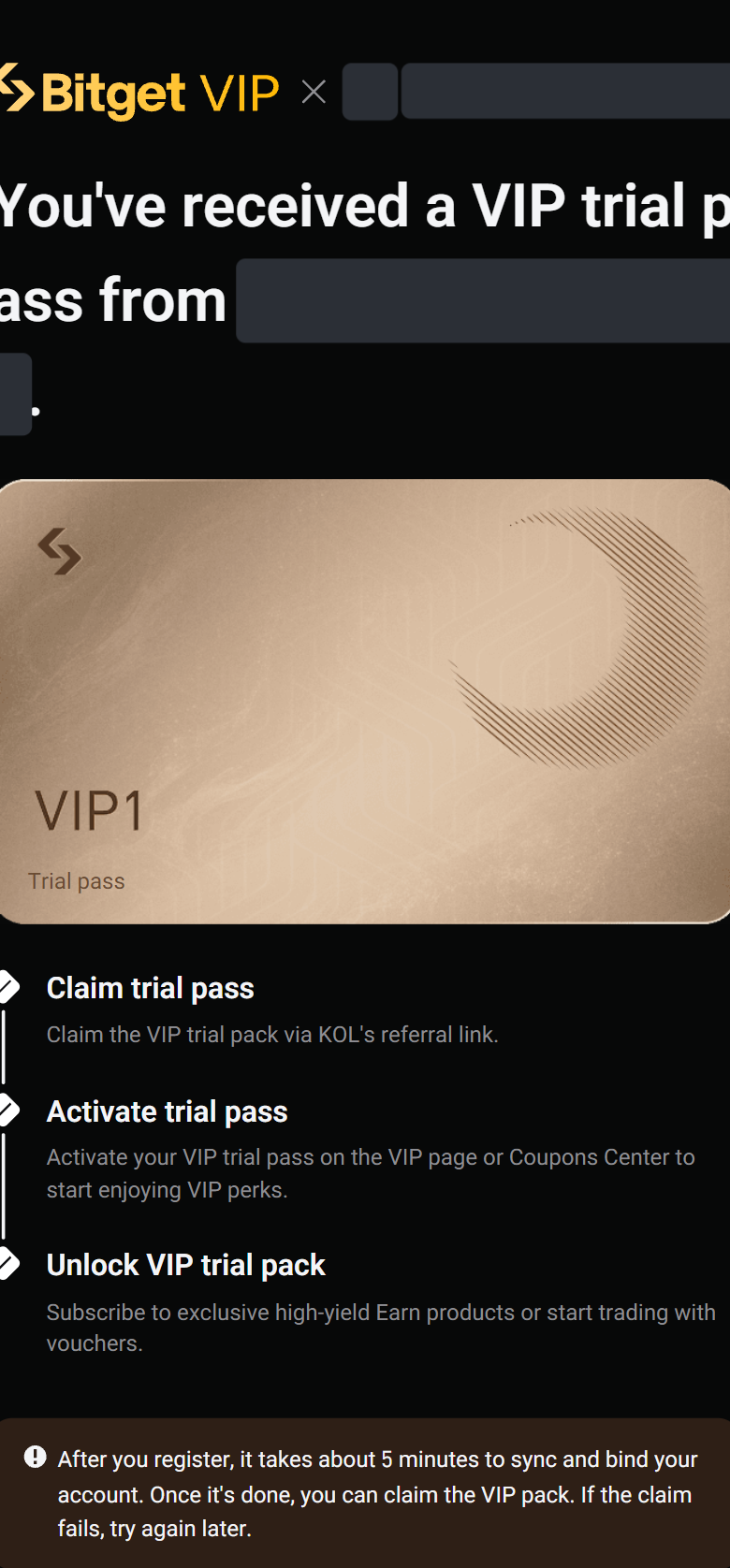
What Bitget says about the trial pass. Bitget's VIP trial help article (updated 2025-07-01, read 2026-11-25) says the pass lets you “enjoy VIP perks before reaching VIP status” but does not say whether that VIP level's fee rates apply, so check your rate on Bitget's fee page after activating it. The same article says the level and duration of the trial are set by the promotion's rules, the countdown starts only after you activate it, and trial users do not receive the VIP welcome gift, VIP protection or exclusive VIP account manager support (some event benefits, such as VIP airdrops, may also be unavailable). You activate it on the VIP page or in the Coupons Center. For reference, Bitget's fee page lists VIP 1 USDT-M futures at 0.019% / 0.060%.
Fee share returned. Through this link, Bitget returns to you 20% of the spot and futures trading fees you pay (operator's partner setting, 25 November 2026, not shown on the sign-up screen; check the fees in your trade/order history). The fee is charged at the normal rate and the share comes back afterwards; the sign-up screen itself does not show this figure. The rates after the share are in the table below (calculated). This share is not claimed for API, elite-trader, on-chain, CFD or Stock+ trading.
What are Bitget trading fees?
VIP 0 unless stated · read 2026-11-25 on bitget.com/fee| Market | Maker / Taker | Round trip on 10,000 USDT |
|---|---|---|
| Spot, VIP 0 | 0.100% / 0.100% 0.080% / 0.080% after the 20% returned through this link (calculated) | 20.00 USDT with market orders both ways; 16.00 USDT after the share (calculated) |
| USDT-M futures, VIP 0 | 0.020% / 0.060% 0.016% / 0.048% after the 20% returned through this link (calculated) | 12.00 USDT with market orders both ways (9.60 after the share), 4.00 USDT with limit orders both ways (3.20 after the share) (calculated) |
| USDT-M futures, VIP 1 | 0.019% / 0.060% | 12.00 USDT with market orders both ways (calculated) |
Where is Bitget not available?
Source: Bitget Terms of Use, updated 2026-11-04Bitget's Terms of Use define its Prohibited Countries as Austria, Belarus, Canada, Cuba, France, Germany, Hong Kong, Iran, Japan, Kazakhstan, Malaysia, North Korea, Russia, Singapore, Sudan, the United States (including its territories and minor outlying islands), Iraq, Libya, Yemen, Afghanistan, the Central African Republic, the Democratic Republic of the Congo, Guinea-Bissau, Haiti, Lebanon, Somalia, South Sudan, Thailand, Ukraine (only Crimea, Luhansk, Donetsk, Kherson and Zaporizhzhia) and the United Arab Emirates, and other places Bitget may name later. Bitget says the services may not be available, and access may be blocked, if you travel to one of them.
Can I add a Bitget referral code after sign-up?
Source: Bitget Affiliates FAQWe found no official way. The referral field is part of Bitget's registration form, and the Bitget Affiliates FAQ (dated 2026-04-22, read 2026-11-25) does not describe a procedure for adding or changing a code afterwards. Treat sign-up as the only chance and check the field before you submit; if you already have an account, ask Bitget support.
Bitget referral code: key facts at a glance
checked 2026-11-25| Referral code | qjj21098 |
| Sign-up page shows | A VIP trial pass card ("VIP1 / Trial pass") and the steps to claim and activate it; no fee figure |
| Trial pass rules | "Enjoy VIP perks before reaching VIP status" for a limited time; level and duration set by the promotion's rules; countdown starts on activation; no VIP welcome gift, VIP protection or account manager for trial users; whether the VIP level's fee rates apply is not stated by Bitget |
| Fee share returned | 20% of the spot and futures fees you pay (operator's partner setting, 25 November 2026, not shown on the sign-up screen; check the fees in your trade/order history); futures 0.016% / 0.048%, spot 0.080% / 0.080% after the share (calculated) |
| Base fees (VIP 0) | USDT-M futures 0.020% / 0.060%; spot 0.100% / 0.100% |
| Code after sign-up | No official procedure found; enter it at registration |
| Not available in | Bitget's Prohibited Countries, including the US, Canada, Japan, Germany, France, Hong Kong, Singapore and the UAE |
| Cost to you | None. CoinPopBit may earn a commission from Bitget. |
What is the Bitget referral code?
The CoinPopBit referral code for Bitget is qjj21098. It goes in the Referral code field of Bitget's registration form; the link below opens that form with the field already filled. With code qjj21098, Bitget returns to you 20% of the spot and futures trading fees you pay (operator's partner setting, 25 November 2026, not shown on the sign-up screen; check the fees in your trade/order history). This share is not claimed for API, elite-trader, on-chain, CFD or Stock+ trading.
- Open the registration page and check that the address bar shows bitget.com.
- Check that the Referral code field shows qjj21098 before you press Next.
- Complete Bitget's identity verification (KYC) to deposit and trade.
- About 5 minutes after registering, claim the VIP trial pass, then activate it on the VIP page or in the Coupons Center when you want its countdown to start.
Frequently asked questions
What is the Bitget referral code for CoinPopBit?
What does the Bitget referral code qjj21098 give?
Does the Bitget code qjj21098 lower trading fees?
What are Bitget trading fees?
What do VIP trial users not get on Bitget?
Can I add a Bitget referral code after I sign up?
Is Bitget available in the United States?
How does CoinPopBit earn from this page?
Verification log
checks done for this page| Date | What we checked | Result |
|---|---|---|
| 2026-11-25 | Sign-up page through the CoinPopBit link, desktop 1440 px and mobile 390 px (captures above) | VIP trial pass panel; Referral code field filled; no fee figure |
| 2026-11-25 | bitget.com/fee (spot and futures tabs) | VIP 0 spot 0.1% / 0.1%, USDT-M 0.02% / 0.06%, VIP 1 futures 0.019% / 0.06% |
| 2026-11-25 | VIP trial help article, VIP page, UTA FAQ and UTA glossary | Trial rules as above (the article does not say whether the VIP level's fee rates apply); the two UTA pages differ on BGB for futures |
| 2026-11-25 | Terms of Use, Affiliate Program Policy, Affiliates FAQ | Prohibited Countries list (updated 2026-11-04); no procedure for adding a code later |
| 2026-11-25 | Operator's partner setting of code qjj21098 (not shown on the sign-up screen) | 20% of spot and futures fees returned to the new user |
Sources and disclosure
Sources: Bitget's registration page opened through the CoinPopBit link (panel text and captures, 2026-11-25), Bitget VIP trial help article, Bitget VIP page, Bitget fee schedule (read 2026-11-25), Bitget Affiliates FAQ, Bitget Terms of Use (Prohibited Countries), Unified Trading Account FAQ and Unified Trading Account glossary. Fee share: the operator's partner setting of code qjj21098 (25 November 2026, not shown on the sign-up screen). Checked: 2026-11-25. Written by CoinPopBit Market Desk; see our editorial policy.
Crypto and leveraged futures trading can lose more than any fee difference. This page is information, not financial advice. See the terms and privacy policy.