

Binance is the world’s number one exchange by spot trading volume. In just seven years since its founding in 2017, its daily trading volume has exceeded $100 billion. It currently supports over 600 coins and has more than 150 million users worldwide.
Many Korean investors use Binance but do not receive proper fee discount benefits. You can get a permanent fee discount of up to 20% with just one referral code, but many people sign up without knowing this or have already registered.
This article was written based on the results of direct testing and verification of Binance by the CoinPop team. We have organized everything Korean users need to know, from how to enter a referral code to fee structure analysis, BNB stacking discounts, KYC verification, the Travel Rule, and security settings.
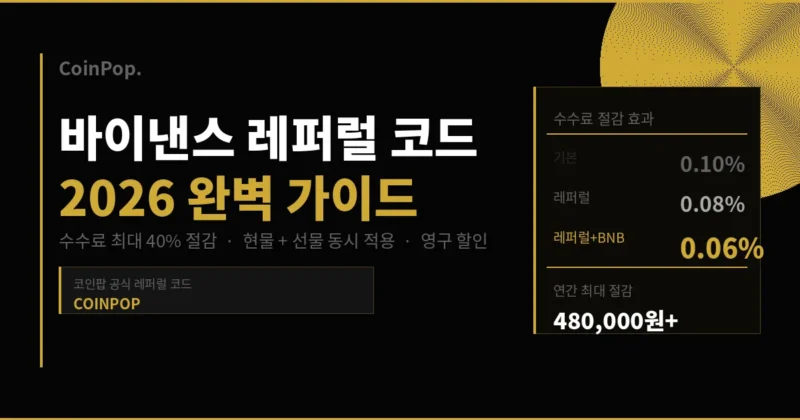
CoinPop Official Binance Referral Code
The first thing you should check before signing up for Binance is the referral code. Since a referral code cannot be applied retroactively after registration is complete, you must have it ready before signing up.
| Category | Details |
|---|---|
| CoinPop Official Referral Code | COINPOP |
| Fee Discount Rate | Permanent 20% discount on Spot + Futures |
| Target Audience | New users only |
| Validity Period | No time limit |
| Registration Link | Sign up via CoinPop referral link |
Accessing the link above will open the sign-up page with the referral code automatically applied. Please ensure that COINPOP is entered in the “Referral ID” field at the bottom of the sign-up page.
What Kind of Exchange is Binance?
History and Scale of Binance
Binance is a global cryptocurrency exchange founded in 2017 by Changpeng Zhao (CZ). Within just six months of its establishment, it grew into the world’s largest exchange and currently provides services to over 180 countries worldwide.
Its daily spot trading volume ranges from approximately $10 billion to $20 billion, maintaining an overwhelming lead over the second-place exchange. It also holds a top global position in the futures market.
In November 2023, Binance reached an agreement with the U.S. Department of Justice to pay a $4.3 billion fine, and former CEO Changpeng Zhao resigned. Since then, new CEO Richard Teng has taken office, focusing on strengthening compliance and regulatory adherence; this event actually served as a turning point for Binance to officially cooperate with regulatory authorities.
Core Services of Binance
Spot Trading: Over 600 coin pairs, minimizing slippage with deep liquidity. You can trade a wide range of assets, from major coins like Bitcoin and Ethereum to newly listed altcoins.
Futures Trading: Supports two types: USDⓈ-M Futures and COIN-M Futures. Trading is available with up to 125x leverage, and daily futures trading volume exceeds $50 billion.
Binance Launchpad: You can participate in token sales for new projects using BNB. This provides significant profit opportunities for early participants, with many past projects seeing price increases of dozens of times or more.
Binance Earn: You can deposit idle assets to earn interest. You can choose between flexible and fixed-term savings, with various options including staking, dual investment, and principal-protected products.
Web3 Wallet: Manage DeFi, NFTs, and multi-chain assets through the built-in Binance Web3 wallet. You can access decentralized services without the need for a separate hardware wallet.
Complete Analysis of Binance Fee Structure
To understand the true value of referral discounts, you must first grasp Binance’s basic fee structure.
Spot Trading Fees
| VIP Level | 30-day Trading Volume | Maker | Taker | When Paying with BNB |
|---|---|---|---|---|
| VIP 0 (Regular) | Less than 10M USDT | 0.1000% | 0.1000% | 0.0750% |
| VIP 1 | 10M USDT or more | 0.0900% | 0.1000% | 0.0675% |
| VIP 2 | 50M USDT or more | 0.0800% | 0.1000% | 0.0600% |
| VIP 3 | 200M USDT or more | 0.0420% | 0.0600% | 0.0450% |
| VIP 4 | 400M USDT or more | 0.0420% | 0.0540% | 0.0405% |
Maker refers to limit orders that provide liquidity to the order book, and Taker refers to market orders that fill existing orders. Since most regular investors use market buy/sell orders, Taker fees are primarily applied.
Futures Trading Fees — USDⓈ-M
| VIP Tier | Maker | Taker | After 20% Referral Discount | After Referral + BNB Discount |
|---|---|---|---|---|
| VIP 0 (Regular) | 0.0200% | 0.0500% | 0.0400% | 0.0300% |
| VIP 1 | 0.0160% | 0.0400% | 0.0320% | 0.0240% |
| VIP 2 | 0.0140% | 0.0350% | 0.0280% | 0.0210% |
| VIP 3 | 0.0120% | 0.0320% | 0.0256% | 0.0192% |
Since futures trading uses leverage, the nominal transaction amount is large, and the fee reduction effect is much greater than in spot trading. Trading 10 million KRW with 10x leverage results in a nominal amount of 100 million KRW, and the difference in fees widens significantly.

Actual Savings Amount When Applying a Referral Code
Let’s calculate based on a monthly spot trading volume of 100 million KRW (Taker basis).
| Condition | Fee Rate | Monthly Fee | Annual Fee |
|---|---|---|---|
| Basic Fee (No Referral) | 0.1000% | 100,000 KRW | 1,200,000 KRW |
| Referral 20% Discount Only | 0.0800% | 80,000 KRW | 960,000 KRW |
| BNB 25% Discount Only | 0.0750% | 75,000 KRW | 900,000 KRW |
| Referral + BNB Applied Simultaneously | 0.0600% | 60,000 KRW | 720,000 KRW |
By applying both the referral code and the BNB discount simultaneously, you can save 480,000 KRW per year compared to the basic fee. If your trading volume is 200 million KRW, you will save 960,000 KRW, and if it is 500 million KRW, you will save 2,400,000 KRW. This amount is secured simply by entering a single code.

How to Sign Up for Binance — Complete Step-by-Step Guide
Requirements Before Signing Up
Please prepare the following in advance for Binance sign-up and KYC verification.
- Valid email address (Gmail, Naver, etc. are all possible)
- ID (Choose one: ID Card, Passport, or Driver’s License)
- Smartphone (for installing 2FA app)
- Google Authenticator app (Free for iOS/Android)
Step 1 — Access the Sign-up Page
Access through the Coinpop official referral link. When you access through this link, the sign-up page will open with the referral code (COINPOP) automatically entered.
If you sign up directly on the Binance site, you must manually enter COINPOP in the “Referral ID (Optional)” field at the bottom of the sign-up page. If you leave this field blank and sign up, you will not be able to receive the fee discount.
Step 2 — Enter Email or Phone Number
For Korean users, we recommend signing up by email. Signing up with a phone number can make it cumbersome to change the number later, and email is more stable as a security recovery method.
If you sign up by phone number, select the country code +82 and enter the remaining numbers excluding the leading 0. (Example: 010-1234-5678 → 10-1234-5678)
Step 3 — Set Password
The password must meet all of the following conditions:
- At least 8 characters
- Include uppercase English letters
- Include lowercase English letters
- Include numbers
- Include special characters (!@#$% etc.)
As a Binance account can hold significant assets, never use the same password as other sites.
Step 4 — Final Confirmation of Referral Code
Before clicking the sign-up button, make sure to check if COINPOP is entered in the “Referral ID” field. If you miss this step, you will not be able to receive discount benefits permanently.
Step 5 — Email Verification
A 6-digit verification code will be sent to the email address you entered. The code is valid for 10–15 minutes; please also check your spam folder. Sign-up is completed after entering the code.
Step 6 — KYC Verification
It is recommended to proceed with KYC verification immediately after completing the sign-up. Withdrawals are restricted while KYC is unverified.
| KYC Level | Required Documents | Daily Withdrawal Limit | Processing Time |
|---|---|---|---|
| Unverified | None | 0 USDT (Withdrawal unavailable) | – |
| Basic Verification (Lv.1) | Photo of ID | 200,000 USDT | Instant to several hours |
| Advanced Verification (Lv.2) | ID + Facial Recognition | Unlimited | Instant to 24 hours |
KYC Process: Login → Profile Icon → Identity Verification → Select Personal Verification → Select Country (South Korea) → Select ID Type → Upload Photo → Facial Recognition (for Lv.2).
All Korean IDs (Resident Registration Card, Driver’s License, Passport) can be used. ID photos must be taken so that all four corners are visible and there must be no light reflection.
Step 7 — 2-Step Verification (2FA) Setup
The first thing you should do after completing KYC is to set up 2FA. Without 2FA, account security is very vulnerable.
How to set up Google Authenticator:
- Install the Google Authenticator app on your smartphone
- Binance Web → Profile → Security → Enable Google Authenticator
- Scan the QR code or enter the code manually
- Enter the 6-digit code displayed in the app to complete
Important: Be sure to write down the backup code (16-digit seed key) displayed during 2FA setup on paper and keep it in a safe place. If you lose your smartphone or delete the app, account access is impossible without this code.

How to apply both Referral Discount + BNB Discount
What is BNB?
BNB (Binance Coin) is a native token issued by Binance. It is used throughout the Binance ecosystem, and you can receive an additional 25% discount if you use BNB for fee payments.
How to set up BNB discounts
- Log in to Binance
- Click the profile icon
- Dashboard → Fees
- Enable “Use BNB to pay for fees” (Toggle ON)
- Maintain a BNB balance in your wallet
If the BNB balance is insufficient, standard fees will be automatically deducted. For futures trading, you must hold BNB separately in your futures wallet.
Result of combining Referral + BNB discounts
| Discount Condition | Spot Fee (Taker) | Futures Fee (Taker) |
|---|---|---|
| Basic Fee | 0.1000% | 0.0500% |
| 20% Referral Discount Only | 0.0800% | 0.0400% |
| 25% BNB Discount Only | 0.0750% | 0.0375% |
| Referral + BNB Applied Simultaneously | 0.0600% | 0.0300% |
The two discounts are applied independently, resulting in a fee reduction effect of up to 40%.
Things to Know When Using Binance in Korea
Binance and Current Regulatory Status in Korea
Binance is currently unregistered with the Korea Financial Intelligence Unit (FIU). Accordingly, direct deposits and withdrawals in Korean Won (KRW) are not possible. Korean users use the platform by purchasing coins from domestic exchanges such as Upbit, Bithumb, and Coinone, and then transferring them to Binance.
This method itself is not currently illegal. However, starting from 2025, as cryptocurrency taxation is implemented, a 22% tax rate will be applied to annual profits exceeding 2.5 million KRW.

Fully Understanding the Travel Rule
The Travel Rule is a regulation that requires the collection and provision of sender and receiver information when transferring virtual assets worth 1 million KRW or more. It has been in full effect since March 2023.
| Transfer Amount | Travel Rule Application | Required Information |
|---|---|---|
| Less than 1 million KRW | Not Applied | Recipient Address Only |
| 1 million KRW or more | Applied | Recipient Name, Recipient Exchange, Address |
Upbit → Binance Transfer Procedure:
- Binance App → Wallet → Deposit → Select the specific coin → Select Network → Copy Address
- Upbit → Withdraw → Select the specific coin → External Address
- Select receiving exchange “Binance”
- Enter recipient information (must match Binance KYC registered name)
- Enter address and proceed with withdrawal
Note: If you are sending funds for the first time, it is recommended to test with a small amount (equivalent to 5–10 USDT) before proceeding.
When withdrawing from Binance to a domestic exchange
The network (chain) of the coin you are withdrawing must match exactly. For example, if you send USDT via the TRC-20 network but the receiving exchange only supports ERC-20, you may lose your funds. Always check the supported network on the receiving exchange first.
Complete Guide to Binance Security Settings
Since a Binance account can hold a significant amount of assets, you must be careful with your security settings.
Essential Security Items
| Security Item | Settings Path | Importance | Description |
|---|---|---|---|
| Google 2FA | Profile → Security → Google Authenticator | Essential | Additional 6-digit code authentication during login or withdrawal |
| Withdrawal Address Whitelist | Profile → Security → Withdrawal Address Management | Highly Recommended | Allows withdrawals only to registered addresses |
| Anti-Phishing Code | Profile → Security → Anti-Phishing Code | Recommended | Displays a code in official Binance emails |
| Login Device Management | Profile → Security → Device Management | Recommended | Immediately delete unrecognized devices |
| API Key Management | Profile → API Management | Depends on user | Delete unused API keys |
Preventing Phishing Attacks
- The official Binance URL is binance.com. Be careful of similar domains such as binnance.com, binanse.com, etc.
- Binance will never request your password or seed key via email or chat.
- Official Binance emails always include your configured anti-phishing code.
- Any account approaching you as a Binance employee on Telegram or KakaoTalk is 100% a scam.
Binance Earn — Monetizing Idle Assets
You can earn interest by depositing your idle assets into Binance Earn.
| Product Type | Features | Estimated APR | Liquidity |
|---|---|---|---|
| Flexible Savings | Withdraw anytime | 1-5% APR | High |
| Locked Savings | Locked for 30·60·90 days | 3-15% APR | None |
| ETH Staking | Receive block rewards | 3-5% APR | Tradable after WBETH conversion |
| Dual Investment | Paid in one of two coins | 10-100%+ APR | None |
USDT Flexible Savings is useful for managing short-term funds as it allows you to earn interest without the risk of losing your principal. However, since platform-specific risks (bankruptcy, hacking, etc.) exist, please avoid depositing all of your assets.
Frequently Asked Questions (FAQ)
Q. Is there a time limit for the referral code?
The official Coinfarm code is valid indefinitely. Discount rates may be adjusted according to Binance policy changes, and Coinfarm updates them immediately upon any changes.
Q. Can I retroactively apply a referral code to an existing account?
It is not possible. Binance referral discounts are applied only at the time of registration and cannot be changed or added to existing accounts. To receive a discount, you must withdraw all assets from your existing account, close it, and then sign up for a new account.
Q. Does the 20% referral discount apply to both Spot and Futures?
Yes, it applies to Spot, USDⓈ-M Futures, and COIN-M Futures. Trading fees for leverage tokens are managed under a separate structure.
Q. Exactly how much discount do I get if I apply both the BNB discount and the referral discount at the same time?
Both discounts are applied independently. From the base fee of 0.1%, a 20% referral discount is applied to make it 0.08%, and then an additional 25% BNB discount is applied, resulting in a final rate of **0.06%**. This effectively results in a total 40% discount.
Q. Is it legally okay to use Binance in South Korea?
Binance is currently unregistered with the Korean FIU, so direct KRW deposits and withdrawals are not possible. The method of purchasing coins from a local exchange and transferring them is not illegal at this time. However, there is an obligation to report taxes on cryptocurrency profits.
Q. Is there a minimum deposit amount for Binance?
Minimum deposit amounts vary by coin. For USDT (TRC-20), the minimum deposit is 1 USDT. When you select the relevant coin and network on the deposit page, the minimum amount will be displayed.
Q. How can I check if the discount has been properly applied after entering the referral code?
After completing registration, you can check it under Profile → Fee Schedule. If it shows **0.08%** instead of the default 0.1% fee, it has been applied correctly.
Q. Can I contact Binance customer support in Korean?
Korean language support is available at the official Binance customer center. If you select App or Web → Support → Chat Support and inquire in Korean, you will be connected to a Korean-speaking representative.
Conclusion
Binance is the exchange that provides the highest liquidity and the most coin pairs in the world. Although there are restrictions for Korean users, such as the inability to deposit or withdraw KRW directly and the application of the Travel Rule, it remains one of the best choices in terms of global market accessibility and diverse trading products.
Entering a referral code takes only 30 seconds during registration, but as a result, you receive a permanent commission discount for as long as you trade. By combining it with the BNB discount, you can save 40% of the base fee, and as your trading volume increases, the savings grow linearly.
| Category | Details |
|---|---|
| CoinPop Official Referral Code | COINPOP |
| Discount Benefits | Spot + Futures Fees 20% Permanent Discount |
| Registration Link | Sign up for Binance with Discount |
※ Coinfarm may receive a small affiliate commission for sign-ups made through this link. No additional costs are incurred by the user, and fee discount benefits are applied identically.